EcosystemNFTsDocs

Footer

Xchange

  • Swap
  • Liquidity
  • Loans
  • Fund
  • Vote

Tokens

  • X7R
  • X7DAO
  • X7D
  • X7101-X7105

Explore

  • Dashboard
  • Guides
  • Integration
  • Whitepaper
  • Breakdowns
  • Onchains
  • FAQs

Community

  • Telegram
  • Twitter
  • Discord
  • Warpcast
  • Blog
  • Links

Permissionless Trustless Decentralized Exchange

Launch your project on Xchange with 10-1000x the initial liquidity across multiple blockchains where anyone can Swap, Borrow and Lend!

X7 Finance·Trust No One. Trust Code. Long Live DeFi.
  • Telegram
  • Twitter
  • Discordś
  • Warpcast
  • YouTube
  • Reddit
  • GitHub
  • Pioneer 1488 avatar
    Guides
    View
  • Pioneer 1488 avatar
    Integration
    View
  • Pioneer 1488 avatar
    Whitepaper
    View
  • Pioneer 1488 avatar
    Breakdowns
    View
  • Pioneer 1488 avatar
    Onchains
    View
  • Pioneer 1488 avatar
    FAQ
    View
    • Introduction
    • Initiate A Loan
    • Provide Liquidity
    • Trade
    • Launch
    • Integrate
    • Lending
    • How Xchange Works
    • Ecosystem Participants
    • Smart Contracts
    • Glossary
    • How Lending Works
    • How Liquidiation Works
    • Swaps
    • Swapping on Xchange
    • Pools
    • Flash Swaps
    • Fees
    • Slippage
    • Pricing
    • Understanding Returns
    • ERC-20 Tokens
    • Liquidity Pools
    • Impermanent Loss
How To's

Deploy Initial Liquidity Loan

Elevate Your Project with Xchange by X7 Finance

Hello, Smart Contract Engineers! Are you ready to take your project to the next level? Xchange, the native Decentralized Exchange (DEX) of X7 Finance, is here to make your token launch a resounding success. Here's why Xchange is the perfect DEX for your token:

Follow these UI steps to select and execute your liquidity loan:

Important contract requirements to deploy on Xchange

  • Ensure to exclude the X7 Lending Pool Contract from any Max TXs and Max fees.

Step 1: Navigate to the Initial Liquidity Loans (ILL) deploy page

Click the link here to Initiate a Liquidity Loan

Step 2: Connect your wallet and select the relevant chain

Choose your desired chain and wallet in the top right hand corner (Ensure your wallet is also connected to the same chain).
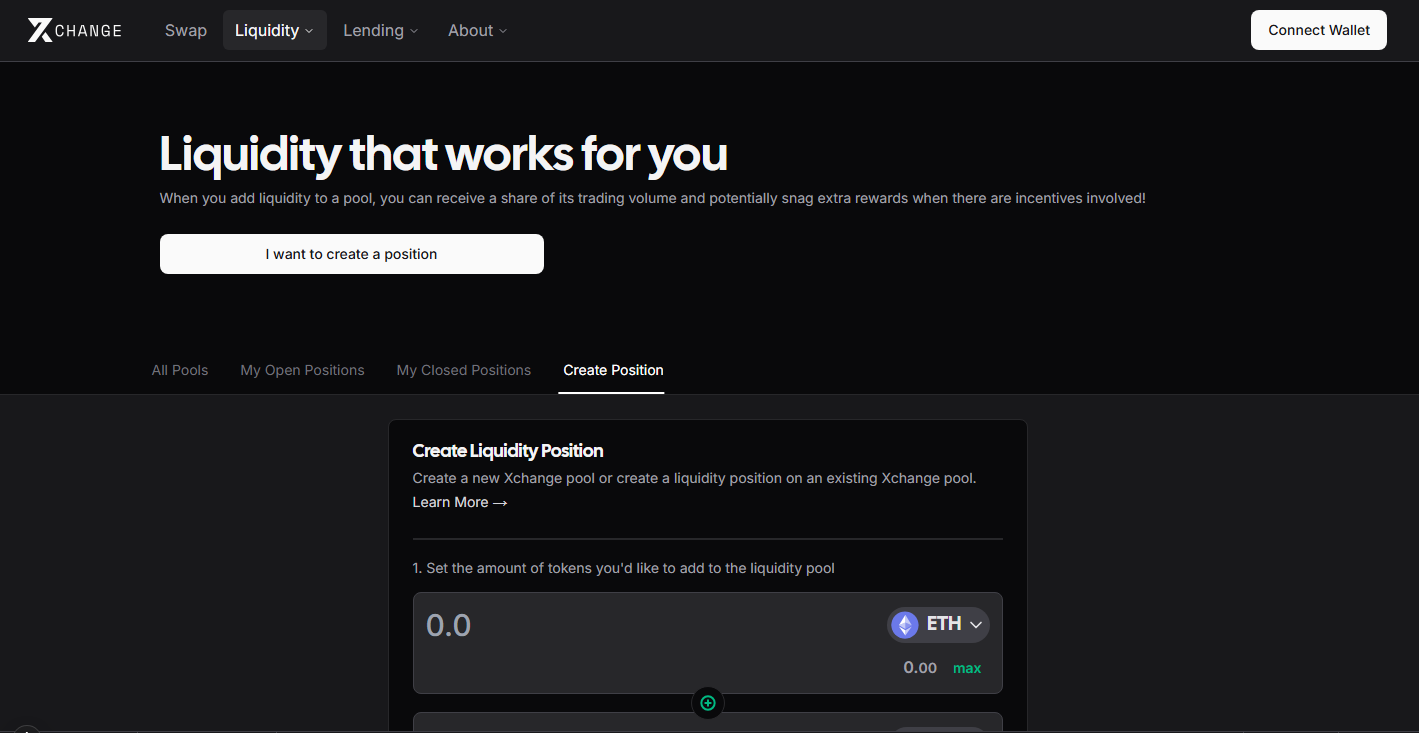
Connect your Cryptocurrency Wallet

Step 3: Select your loan terms

Select the loan term option that best suits your needs.

Select the Loan Terms

Next select the length of the loan and the amount of native token to borrow. The value must be between the value displayed in the notification.
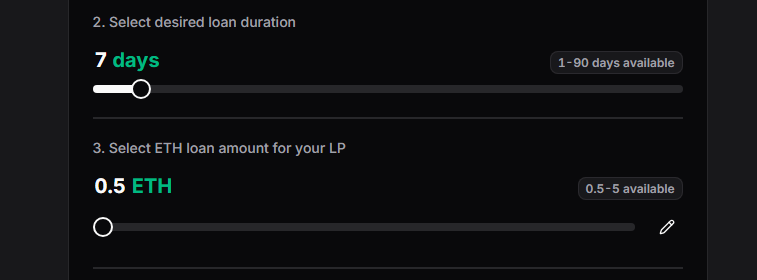
Select the Loan Amount

Step 4: Review Loan terms

Here you will see an overview of the loan details, ensure the loan meets your needs.
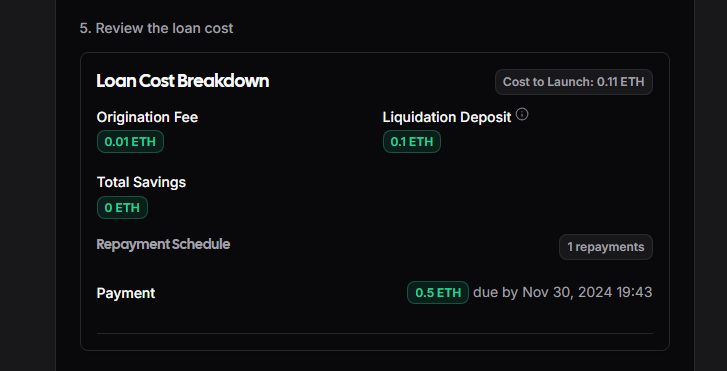
Select the Loan Duration

Step 5: Approve Token For Trade

Approve the token for trading on Xchange. Click approve and sign the transaction via your wallet integration provider.
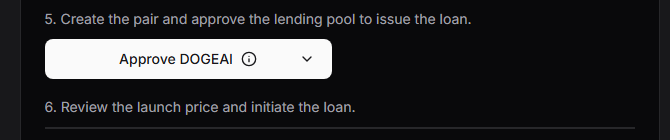
Select the Loan Duration

Step 6: Review Launch Price

This is the most important step: if a market already exists for the pair, you should aim to launch the xchange pair as close to the existing market price as possible. This prevents the newly launched xchange pair from being extremely volatile and ensures tradability at launch.
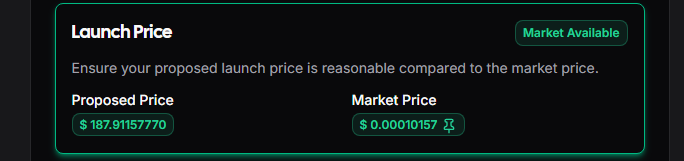
Review Launch Price

Step 7: Deploy the ILL for your project

When all the above steps are completed the 'Inititate Loan' button with become enabled. Click this button and confirm the transaction via your wallet integration provider.
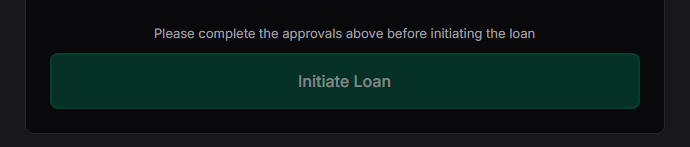
Select the Loan Duration

Congratulations your ILL is now deployed

Your liquidity pair is now deployed and ready for trading.

You can monitor the repayment progress of your ILL via the Loan Repayment Page Here

or view all of the loans on any chain using the Loan Dashboard Page Here

Trust No One. Trust Code. Long Live DeFi!

Previous
← Initiate A Loan
Next
Trade →

-

  • Pioneer 1488 avatar
    Guides
    View
  • Pioneer 1488 avatar
    Integration
    View
  • Pioneer 1488 avatar
    Whitepaper
    View
  • Pioneer 1488 avatar
    Breakdowns
    View
  • Pioneer 1488 avatar
    Onchains
    View
  • Pioneer 1488 avatar
    FAQ
    View

On this page

  1. Elevate Your Project with Xchange by X7 Finance

  2. Follow these UI steps to select and execute your liquidity loan:

    1. Important contract requirements to deploy on Xchange
    2. Step 1: Navigate to the Initial Liquidity Loans (ILL) deploy page
    3. Step 2: Connect your wallet and select the relevant chain
    4. Step 3: Select your loan terms
    5. Step 4: Review Loan terms
    6. Step 5: Approve Token For Trade
    7. Step 6: Review Launch Price
    8. Step 7: Deploy the ILL for your project
    9. Congratulations your ILL is now deployed